
Invented by CLARK; Duncan Antony Ernest, Canva Pty Ltd

Webpages today are more than just words and pictures. They can move, tell stories, and react to what you do. A new patent application describes a way to make these “scrollytelling” webpages much easier to build and use. Let’s take a close look at what this invention is, why it matters, and how it’s different from what came before. This guide will help you understand the background, the science, and the heart of the new idea, all in easy terms.
Background and Market Context
To understand why this invention is important, it helps to think about how people use the web. For a long time, webpages were very simple. You’d open a page, and see words and pictures stacked on top of each other. If you wanted to see more, you’d scroll down. Everything just moved up or down together. This worked fine for news stories, blogs, or about pages. But as the web grew, people wanted more. They wanted stories that felt alive, where pictures and text could move in special ways, and where you could feel like you were part of a story instead of just reading it.
This is where “scrollytelling” comes in. Scrollytelling is a way of making web pages that respond as you scroll. For example, as you scroll down, a picture might stay still while words move over it. Or, as you pass a certain part of the text, a background image might change. It’s a powerful way to guide attention and make stories more interesting. You see scrollytelling in news stories, data visualizations, and even in online portfolios.
Making these kinds of pages, though, is hard. A web developer, someone who builds web pages, has to write special code. They need to use HTML and JavaScript, and sometimes tools like iframes. If you are not a developer, it’s almost impossible. Even for experts, it’s tricky to make everything work smoothly across different browsers and devices.
Why is this so hard? First, there are technical problems. For example, if you use something called an iframe—a box inside the web page that can show another web page—it doesn’t always scroll well. Sometimes, when you scroll fast, you skip over the special scrollytelling part. Or, the text and images in the iframe don’t match the styles of the main page, so everything looks odd and out of place.
The market needs a better solution. Website owners want to make their pages more interactive and exciting without hiring expensive developers. Teachers, journalists, marketers, and small business owners all want to tell better stories online. Tools like this could let anyone add beautiful, moving stories to their website. It would save time, money, and make the web a more fun place to explore.
This is why the new patent matters. It offers a simple, repeatable way to add scrollytelling to any webpage. It solves real problems that developers have had for years. And, maybe most importantly, it makes powerful web stories available to everyone, not just the tech experts.
Scientific Rationale and Prior Art
Before we talk about the new invention, let’s look at how things have been done before, and why those ways had problems.

The basic idea behind scrollytelling is that different parts of the page—backgrounds and foregrounds—can move or stay still as you scroll. Backgrounds are things like pictures or videos that sit behind the text. Foregrounds are the words, captions, or images that sit on top. The magic of scrollytelling is how these parts move in relation to each other as you scroll down the page.
The simplest way to make a page is to just stack everything in order. The background and foreground move together. But this doesn’t feel very dynamic or special. To make things more interesting, developers started using tricks. One trick was to “fix” a background in place, so as you scrolled, the background stayed put and the text floated over it. This could be done with CSS, the styling language of the web, using things like “position: fixed” or “position: sticky.”
But this was limited. If you wanted to have more than one background image, or to change which background was shown as you scrolled, it became very hard. You’d have to write lots of code to track where the user was on the page, and to swap backgrounds at just the right moment. If you wanted to use an iframe, things got even harder. An iframe is a way to embed a whole other web page inside your page. It’s often used for security, or to keep code separate.
But iframes have big problems with scrolling. When you scroll the main page, the iframe doesn’t always know what’s going on. Sometimes, you can scroll right past the iframe without it reacting at all. Sometimes, the styling of the iframe is totally different, so the text and fonts look wrong. There are also issues with passing messages between the main page and the iframe. If you want the main page to know when something changes in the iframe, or vice versa, you have to use special “postMessage” code, which is confusing and easy to get wrong.
Developers have tried to fix these problems in different ways. Some would put everything on a single page, and use lots of JavaScript to track scrolling. Others would use “IntersectionObserver,” a tool that lets you see when something comes into view on the screen. But every time, the code got more complex. It was easy to make mistakes, and hard to make everything look smooth and natural.
Also, there was no standard way to let people who aren’t developers create these kinds of stories. If a teacher wanted to tell a story with scrolling pictures and captions, they’d have to hire someone. There were no easy tools or templates to make this simple.
In summary, the prior art—the old ways of doing this—were either too simple and not very interactive, or too complex and out of reach for most people. There were technical barriers, style problems, and lots of headaches with scroll handling and communication between different parts of the page.
The new invention builds on these old ideas but finds a new, easier way. It keeps the benefits of using separate containers, like iframes, but solves the problems of scroll control and styling. It makes it possible to add scrollytelling to any page, in a way that feels smooth and fits with the rest of the site.
Invention Description and Key Innovations
Now let’s look at what the new patent actually does, and why it’s different.

This invention is about a method (and also a system) for adding dynamic scrollytelling to a web page. It starts with a main web page. This is just a regular web page, like you’d see on any site. Into this main page, you can add a “subpage script.” This script is a piece of code that knows how to fetch and handle something called subpage data.
The subpage data describes a scrollytelling experience. It includes background items (like images), foreground items (like text or captions), and rules for when to show each background. The background items are put into a container, and the foreground items are turned into elements that will be shown on top.
The key is how everything is structured:
– The subpage container is usually an iframe. This keeps the backgrounds separate and safe.
– The subpage section is a part of the main page (often a DIV) that holds both the container (with backgrounds) and the foreground elements.
– The foreground elements are added to the main page, not the iframe. This means they can share the same styles (fonts, colors, etc.) as the rest of the page. This solves a big problem from before, where things inside the iframe looked out of place.
– A tracking mechanism is added to watch how the foreground elements move as you scroll. This is often done using “IntersectionObserver,” which can see when an element comes into view or leaves the screen.
– Display rules are used to decide when to switch backgrounds. For example, if a certain caption scrolls into view, the background might change to a new image or state.
Here’s how it works, step by step:
1. The main page loads and finds the subpage script.
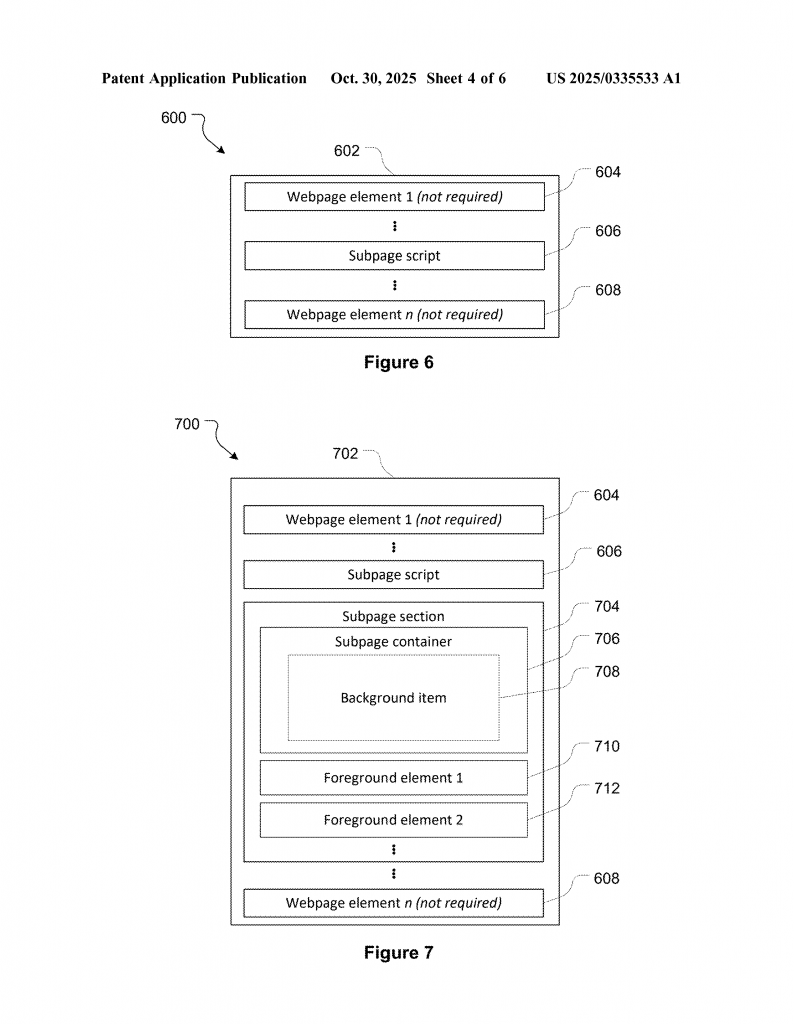
2. The script fetches the subpage data, which describes the backgrounds, foregrounds, and rules.
3. The page is updated to include a subpage section (usually a DIV).
4. The subpage container (an iframe) is added inside this section, and the backgrounds are loaded into the iframe.
5. The foreground elements (like text captions) are created from the subpage data and added to the main page, inside the subpage section but outside the iframe.
6. A tracking mechanism is set up to watch how the foreground elements move as you scroll.
7. As you scroll, the tracking mechanism checks if any display rules are triggered. If so, it sends a message to the iframe to change which background is shown.
8. The main page is displayed, and as the user scrolls, backgrounds and foregrounds interact in a smooth, dynamic way.
This approach has several key innovations:
– Smooth scroll control: By putting the foreground elements in the main page, and only the backgrounds in the iframe, the page can control how everything moves. This avoids the problem of skipping over the scrollytelling section or losing scroll control.
– Consistent styling: Foreground elements share the same styles as the main page, so everything looks like it belongs together.
– Easy communication: When a foreground element moves into view or out of view, the tracking mechanism uses simple messages (like changing the URL hash for the iframe) to tell the background to change. No complex “postMessage” code is needed.
– Reusable and simple: This system can be packaged as a script that anyone can add to any webpage. The subpage data can be created by a builder app, so even non-developers can make scrollytelling stories.
– Flexible backgrounds and foregrounds: Backgrounds can be images, different states of an image (like zoomed in or out), or even videos. Foregrounds can be text, images, or other elements.
– Clear rules: Display rules decide exactly when to switch backgrounds, based on how the user scrolls. This makes it easy to design complex stories without writing lots of code.
Let’s say you are a teacher making a lesson about world maps. You could use this system to show a big map as the background, with different captions appearing over it as you scroll. As you reach a caption about Africa, the background could zoom in to Africa. When you reach a caption about Europe, the background could pan to Europe. All of this would happen smoothly, without the teacher having to write any code.
For a news website, a reporter could use this to show charts or photos that change as the reader scrolls through the story. For a business, a marketer could tell a brand story with moving pictures and text, making the site more engaging.
This invention isn’t just about making web pages prettier—it’s about making powerful storytelling tools available to everyone. It bridges the gap between simple, static pages and complex, developer-only scrollytelling frameworks. It solves the problems of scroll control, style mismatches, and complex communication, all in a package that’s easy to use and fits into any site.
Conclusion
Webpages are changing. People expect more than just words and pictures—they want stories that move and react as they scroll. The new patent for scrollytelling makes this possible in a simple, flexible, and user-friendly way. It solves real problems that have stopped scrollytelling from becoming mainstream. By splitting backgrounds and foregrounds, controlling scroll behavior, and making it easy to set up display rules, this invention lets anyone create rich, interactive stories on the web. Whether you are a teacher, a journalist, or a small business owner, this tool opens the door to a better, more engaging web.
If you want your web pages to stand out, and to tell stories that people remember, this new approach to scrollytelling could be the answer. It’s a fresh way to build the future of web storytelling—one scroll at a time.
Click here https://ppubs.uspto.gov/pubwebapp/ and search 20250335533.