
Invented by Draper; Andrew William, He; Haijin, Ravichandran; Karthick Raja, Munshani; Kunal Sean, Davis; William Michael, Zhao; Xiaoyang

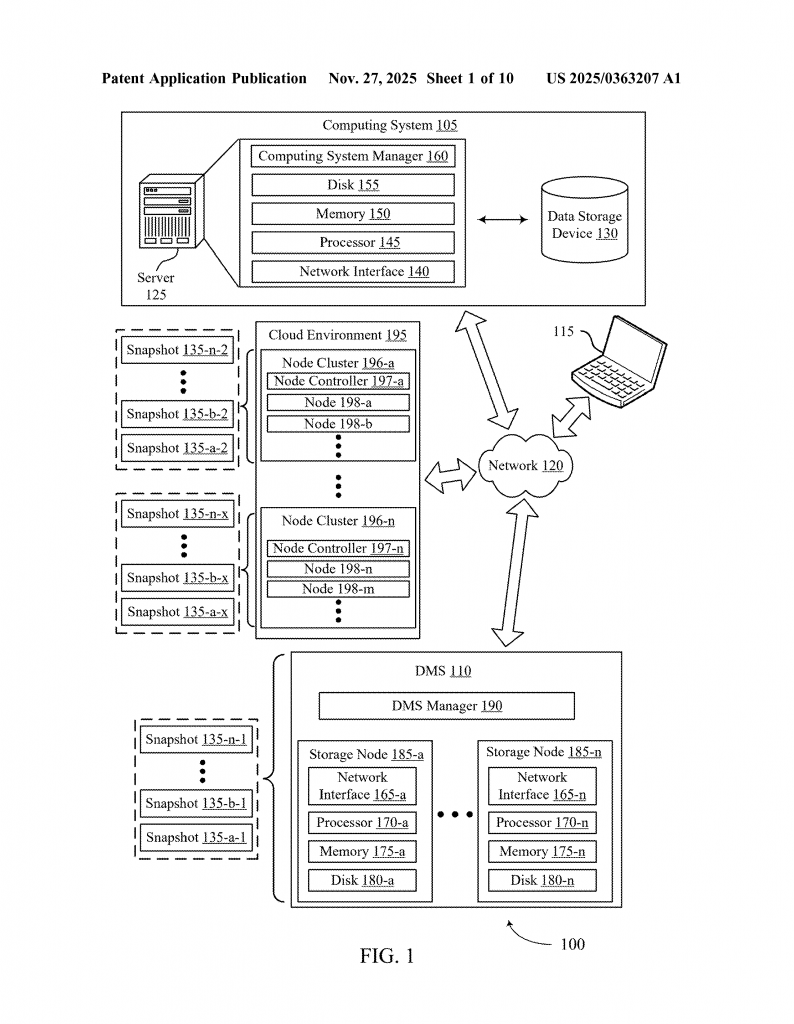
Let’s talk about how backup systems keep your data safe, especially when threats like malware and ransomware try to sneak in. This article looks closely at a patent application for a smarter way to handle quarantine checks and performance monitoring during data recovery. We’ll break down why this matters, what’s been done before, and what’s new in this invention—all in simple words.
Background and Market Context
More people and businesses than ever rely on computers to store and use their most important information. We trust computers to keep our emails, photos, business files, and even whole servers safe. But with this digital convenience comes risk—bad software, called malware, can hide in files, sneak into backups, and spread when you try to restore your data. This is why backup systems have to do more than just save and recover files; they also need to make sure they don’t bring back infected data during a restore.
In the past, backup tools focused on making copies and restoring them quickly if something went wrong. As threats grew, these systems started checking for problems like malware before letting you bring data back. If something looked suspicious, the backup system would “quarantine” the data—basically locking it away so it couldn’t harm anything else. Think of quarantine like putting a sick person in a separate room to keep others healthy.
But here’s the challenge: situations where backups are actually quarantined are rare. Because of this, it’s tricky to regularly test if the quarantine checks work well or even work at all. If you don’t test features often, you might miss mistakes, slowdowns, or security holes. On the other hand, you don’t want a system so strict that it blocks real data recovery when nothing is wrong. So, backup companies need a way to make sure quarantine checks work and don’t slow things down, even when real threats are rare.
At the same time, the cloud and virtual machines have made things more complicated. Backups might come from Windows, Linux, or other systems, and the backup server itself might run on Unix. Restoring files means changing file paths and formats, which isn’t always simple. If this goes wrong, you might not get your data back at all, or you may even restore malware by mistake.
Data management is now a big business. Companies spend lots of money to make sure their data is safe, fast to recover, and not hiding any threats. As rules around data safety grow tighter and cloud systems get more complex, there’s a real need for smarter, more automatic ways to check for and enforce quarantine rules—without slowing down or risking real data recovery.

Scientific Rationale and Prior Art
Let’s look at how backup systems have tried to solve this problem before, and why those methods sometimes fall short.
Traditional backup and restore tools were simple. They made copies of your files at regular times (called “snapshots”) and let you bring them back if needed. As malware threats grew, some products added scanning tools. These tools checked for known viruses in the backups. If a file or snapshot looked suspicious, it was flagged or blocked from being restored. This was a big step forward, but it came with problems.
First, most backup systems only checked for threats when you tried to restore data. If the file was flagged as bad, the system would stop you from bringing it back. This stopped the spread of malware, but also meant you might lose access to important data—even if it was just a false alarm. If the tools had bugs, you might not notice until it was too late because real quarantined events didn’t happen often enough to test the system’s rules or performance.
Next, checking for threats was often “all or nothing.” Either a file was blocked, or it wasn’t. There wasn’t much room for testing or measuring how well the quarantine checks worked. If there was a mistake in the file path conversion (like changing a Windows path to a Unix path), it might go unnoticed. Over time, as more types of computers and storage were added, these conversions got more complex and prone to errors. If a backup was made on Windows and restored on Unix, or from one type of virtual machine to another, the system needed to reliably translate paths and formats. Any mistake could mean restoring the wrong file, missing data, or letting malware back into the system.
Some backup products used middleware—software that sits between the user and the backup engine—to add security checks. But these checks were only triggered during rare quarantine events, which meant there was little real-world data to monitor for errors, speed, or reliability. If a company wanted to test or improve its quarantine enforcement, it often had to create fake threat scenarios, which didn’t always match real-world conditions.
Other systems tried to gather metrics (like how fast a restore happened or how many errors occurred) during normal restores, but didn’t always include the extra steps that happen during quarantine enforcement. This made it hard to spot real slowdowns or bugs in the special quarantine logic.
Finally, as cloud storage and virtual environments became standard, backup and restore workflows had to support many different file systems and versions. Each new system or update meant more chances for bugs or slowdowns in the way file paths were changed or checked. Without regular, automatic testing of these conversions—even when there was no actual threat—it was easy to miss mistakes that could hurt performance or security.
In summary, old methods had a few key weaknesses:
– Quarantine checks only ran in rare cases, so they weren’t tested often.
– Errors in file path conversion or metadata lookup could go unnoticed.
– Performance was hard to measure and improve, especially for special quarantine logic.
– Growing system complexity (cloud, VMs, mixed OS) made errors more likely.
– Getting real-world data about how quarantine enforcement impacted restores was difficult.
Invention Description and Key Innovations
This patent application introduces a way to bring quarantine enforcement out of the shadows and into regular use—without putting real data at risk or slowing down normal recovery. The main idea is to let the backup system run its full quarantine enforcement process during a set portion of all restore requests, even if there’s no real threat. The system then watches for errors, slowdowns, or mistakes, and collects performance data. This means the logic is tested and measured often, giving engineers the feedback needed to keep it fast and reliable.
Here’s how the new solution works, step by step, in plain words:
When you—or a program—ask the backup system to recover a file, folder, or virtual machine from a snapshot, the system first checks if the snapshot is flagged for quarantine. If it is, the recovery is blocked or handled very carefully to avoid spreading threats. If it isn’t, the system may still, depending on its settings, choose to run the full quarantine enforcement logic anyway. This is called “shadow mode.”
In shadow mode, the backup system:
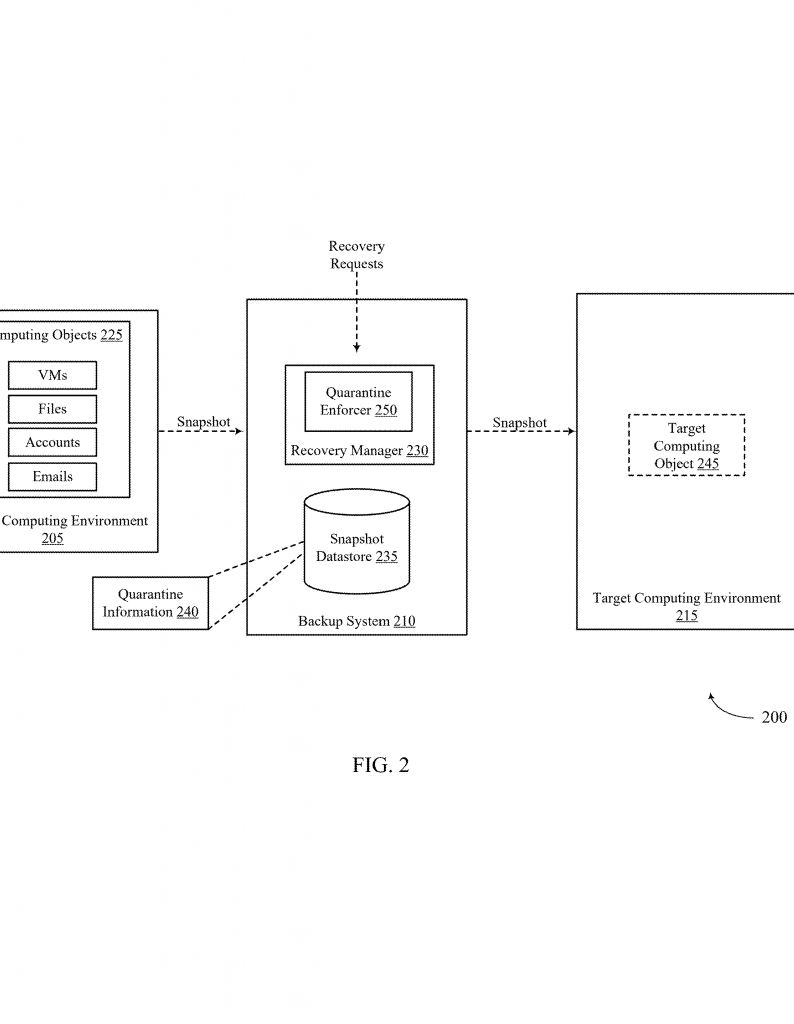
– Converts file paths from the format used in the original system (like Windows) to the format it uses internally (like Unix), even if the data isn’t quarantined.
– Checks if the file path conversion was successful and if the data lines up as expected.
– Runs all the same checks it would do if the snapshot was actually in quarantine.
– Collects information on how long each step took, if there were any errors, and what kind of errors happened.
– Keeps track of recovery metrics, like how many files were restored, what types they were, and which users started the process.
This approach has several big benefits. First, it means the rare and complicated quarantine enforcement logic gets used and tested often, so bugs or slowdowns show up quickly. Second, the system gathers real data about performance and errors in all kinds of restore scenarios—not just the rare cases when a real threat is found. This makes it much easier for backup vendors and IT teams to spot and fix problems before they affect real restores. Third, because the system can be set to run shadow mode on a chosen percentage of restores (like 10% or 20%), it won’t slow down the whole system or block important data when there’s no real threat.
Another key part is how the system handles file path conversions. In modern environments, files might be stored in many different ways. When restoring, the backup system often needs to change the file path from one style to another. For example, a file backed up from Windows might have a path like C:\Users\John\Documents\file.txt. But when restored to a Unix system, it might need to become /home/john/Documents/file.txt. Getting this right is crucial—otherwise, files might not be restored correctly, or worse, malware might slip through. The invention’s logic checks these conversions every time, even for files not flagged for quarantine, and logs any errors or slowdowns.
This “test by doing” approach is much better than waiting for a real problem to show up. It lets you spot mistakes in path handling across all the different systems, versions, and file types your company might use.
The system also monitors how long it takes to look up metadata, like checking if a file or snapshot is quarantined. It records how many errors happen, how long queries take, and what happens if a database can’t be reached. This is important for making sure the system isn’t slowing down, especially as the amount of data grows.
Finally, the backup system collects general recovery metrics along with quarantine-specific ones. This includes things like:
– How many recovery operations are happening
– What types of objects are being restored (files, VMs, databases)
– Details about the files (types, parent folders)
– Who is doing the restore, and what permissions they have
This extra information helps companies spot trends, understand who is restoring data and why, and make better decisions about data safety and user permissions.
All of these logs and metrics can be reviewed through a user interface, letting IT staff see at a glance if there are bottlenecks, errors, or trends that need attention.
To sum up, the key innovations in this patent include:
– Running the full quarantine enforcement logic on a chosen portion of all restores (“shadow mode”), not just when real threats are flagged
– Watching and logging how long each step takes and what errors happen, especially for file path conversions and metadata lookups
– Allowing the system to be configured, so shadow mode can be turned on for any percentage of restore requests
– Collecting both quarantine enforcement metrics and general recovery metrics together for a complete view of system health
– Making it easier to spot and fix problems before they affect real restores or customers
Conclusion
Backup systems are the last line of defense against data loss and malware attacks. But to be truly safe, they need to do more than just block known threats—they must also regularly test and measure their own ability to enforce quarantine rules, even when real threats are rare. This patent application introduces a clever way to make quarantine logic part of everyday data recovery, gathering valuable performance and error data along the way. By using shadow mode, watching file path conversions, logging recovery details, and making all this visible to IT teams, the invention helps businesses stay ahead of threats and avoid costly restore failures. In a world where data is everything, these new tools make backup and recovery both smarter and safer.
Click here https://ppubs.uspto.gov/pubwebapp/ and search 20250363207.